测试向:利用 libfaketime 便捷修改系统时间
你是否遇到过类似于的场景问题:开发的功能需要跨时间进行开发自测,比如考勤系统自动发假期按日汇总日报,按月汇总月报、融资利息动态调整,贷款业务跨年利息计算等等,这些业务都会存在测试时间耗时长,并且测试用例会因为日期跨越变得很不可控。
现司一直都有这类业务的场景,传统做法是程序部署在 windows server 机器上,然后测试人员直接修改 windows 操作系统的时间然后重启程序,把服务器调整到指定的时间进行测试,这样的话会存在 windows 宿主机发生了变化后,很多因素变得不可控,并且需要频繁的重启服务,如果有一些定时任务是根据按天按小时进行定期执行的话,测试用例可能覆盖不了真实的情况。
为了解决这一问题,问了 AI 相关方案,AI 虽然给出了一些方案,但是会存在各种奇奇怪怪的问题。
第一,程序内使用时间的地方统一调用一个指定方法,然后可以进行动态的伪造这个时间,这个方法只能针对于业务代码,如果涉及到第三方包会存在无法拦截的情况或者拦截不全的情况。
第二,直接通过程序反射拦截 Java 底层获取时间的相关方法,但是某些方法是依靠 native 实现的可能也会存在问题。
第三,直接通过修改部署程序的容器时间,从而只影响单个容器时间,不影响宿主机时间。
第四,通过类似于 jvm-sandbox 等直接动态时间,但是 alibaba 这个项目已经停更很久了,以及 issue 上存在说不支持 jdk17+高版本
综合对比下来只有使用一个开源项目libfaketime 来进行直接快速修改 linux 的时候,并且可以做到任何时间的漂移。
开源项目地址:https://github.com/wolfcw/libfaketime
这个开源项目是 C 写的,必须每次去执行,就在思考能不能直接通过 API 直接去动态操作,就不用重启服务并且更加便捷。
于是用 AI codebuddy 以及 IDEA通义灵码周末花了点时间实现了一下,全程只用告诉思路,没写几行代码就搞定了,对于这种简单的需求甚至不需要 cursor,claude code 出手。
前提准备
首先要先在容器里安装 libfaketime 依赖,如果容器使用的基础镜像和宿主机一样也可以直接宿主机安装和了之后映射进容器使用。
Debian/Ubuntu:
sudo apt-get update && sudo apt-get install -y libfaketimeAlpine:
apk add --no-cache libfaketime自定义编译:
https://github.com/wolfcw/libfaketime.git
cd libfaketime
make
make install
常见用法
export LD_PRELOAD=/usr/lib/x86_64-linux-gnu/faketime/libfaketime.so.1 FAKETIME="@2026-02-08 20:40:39" FAKETIME_DONT_RESET=1 FAKETIME_NO_CACHE=1主要改变 FAKETIME的值。
- 相对于当前真实时间进行偏移,支持年(y)、月(m)、日(d)、小时(h)、分钟(M)、秒(s)单位,例如:
+2d(两天后)、-1h(一小时前) - 冻结到指定时间,有@冻结后会再自动流逝,没有@则固定到指定时间一直不变,例如:
@2026-02-08 20:43:03,2026-02-08 20:43:03 - 加速时间,例如:
+0 x1(正常流逝时间),+0 x60(加速 60 倍时间流逝,1s 钟相当于走 1 分钟) - 组合使用,只要符合正确的语法可以组合使用,例如:
@2027-02-08 20:43:03 x60(指定到 2027 年 2 月 8 日并且以 60 倍加速流逝)
更多用法可以参考官方说明:https://github.com/wolfcw/libfaketime/blob/master/README
编码实现在线动态修改
首先需要提供几个便捷的接口,主要动态操作一个libfaketime 底层控制的一个文件,这样可以做到多个容器都共享一个时间同时做到一致修改。
对外暴露 API 并且可以通过界面进行操作。
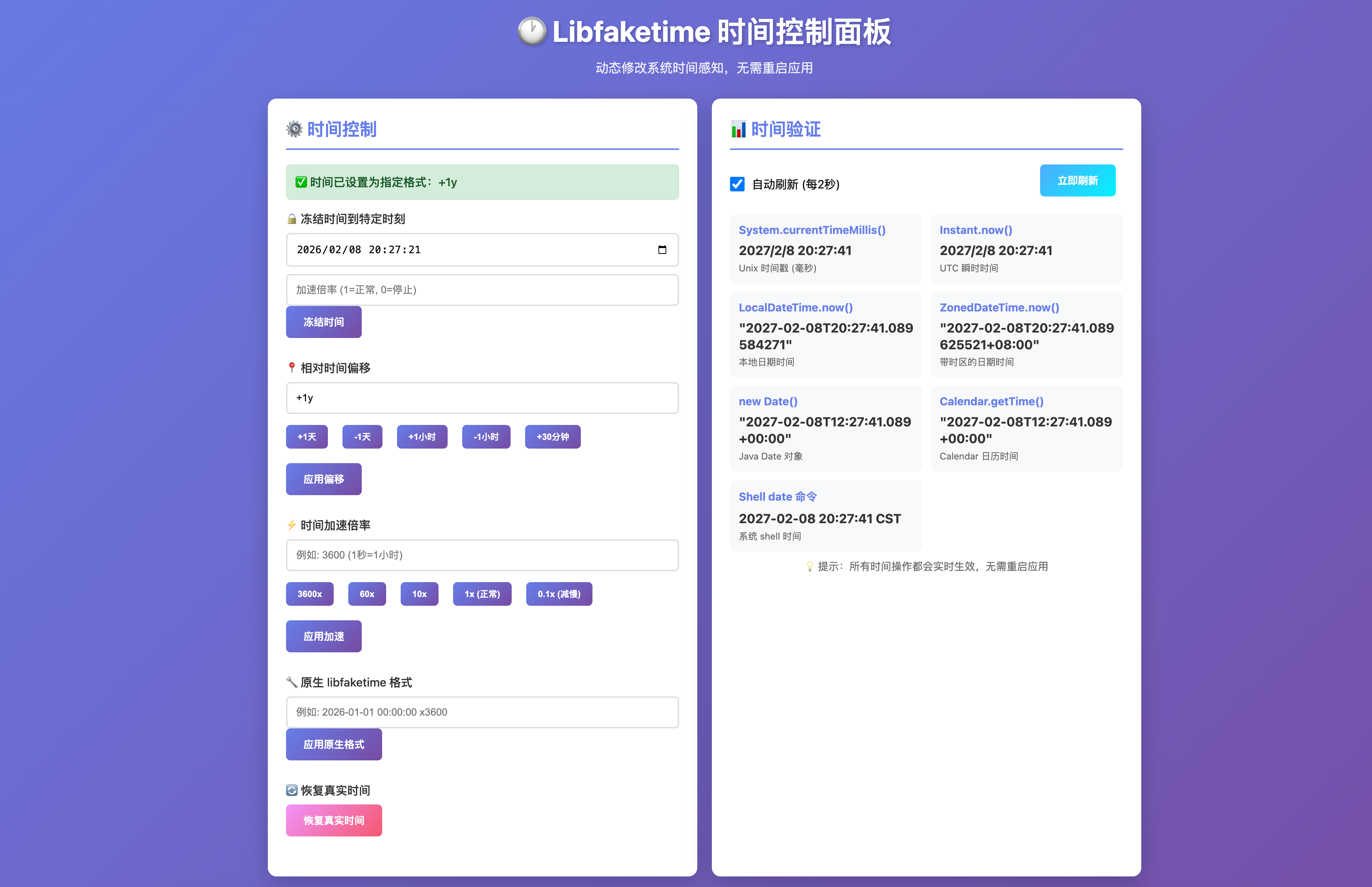
核心后端代码:
package io.github.lcry.libfaketime.autoconfigure.controller;

import io.github.lcry.libfaketime.autoconfigure.LibfaketimeProperties;
import io.github.lcry.libfaketime.autoconfigure.service.LibfaketimeService;
import io.github.lcry.libfaketime.autoconfigure.vo.LibfaketimeUpdateVO;
import io.swagger.v3.oas.annotations.Operation;
import io.swagger.v3.oas.annotations.Parameter;
import io.swagger.v3.oas.annotations.media.Content;
import io.swagger.v3.oas.annotations.media.Schema;
import io.swagger.v3.oas.annotations.responses.ApiResponse;
import io.swagger.v3.oas.annotations.tags.Tag;
import jakarta.annotation.PostConstruct;
import lombok.extern.slf4j.Slf4j;
import org.springframework.beans.factory.annotation.Autowired;
import org.springframework.stereotype.Controller;
import org.springframework.web.bind.annotation.*;

import java.time.Instant;
import java.time.LocalDateTime;
import java.time.ZonedDateTime;
import java.util.Calendar;
import java.util.Date;

/**
 * <p>时间漂移动态控制器</p>
 * <p>本控制器通过动态配置的路径操作 libfaketime 配置文件,实现不重启服务的情况下动态修改系统感知时间。</p>
 *
 * <p><b>功能特性:</b></p>
 * <ul>
 * <li>提供 REST API 接口进行时间控制操作</li>
 * <li>内置可视化 Web 控制面板,支持图形化操作</li>
 * <li>支持实时时间验证,查看多种时间 API 的返回值</li>
 * </ul>
 *
 * <p><b>访问地址:</b></p>
 * <ul>
 * <li>可视化页面:GET /libfaketime.html 或 GET /api/libfaketime/page</li>
 * <li>时间验证:GET /api/libfaketime/verify</li>
 * </ul>
 *
 * <p><b>配置要求:</b></p>
 * <ul>
 * <li>需要在 {@code application.yml} 中配置 {@code libfaketime.config-path}</li>
 * <li>环境变量 {@code FAKETIME_NO_CACHE=1} 必须开启</li>
 * <li>环境变量 {@code FAKETIME_TIMESTAMP_FILE} 必须与配置路径指向同一文件</li>
 * </ul>
 *
 * @author lcry
 * @since 2026/02/07
 */
@Tag(name = "Libfaketime 时间控制", description = "基于libfaketime的时间控制API,支持动态修改系统时间感知和验证")
@RestController
@RequestMapping("/api/libfaketime")
@Slf4j
public class LibfaketimeController {

    /**
     * 重定向到可视化页面
     * 访问 /api/libfaketime/page 时重定向到静态 HTML 页面
     *
     * @return 重定向到可视化页面
     */
    @GetMapping("/page")
    public String redirectToPage() {
        return "redirect:/libfaketime.html";
    }

    @Autowired
    private LibfaketimeService libfaketimeService;

    @Autowired
    private LibfaketimeProperties properties;

    /**
     * 控制器初始化,打印当前生效的配置文件路径,便于排查挂载问题。
     */
    @PostConstruct
    public void init() {
        log.info("[Libfaketime] 控制器已就绪,配置文件路径: " + properties.getConfigPath());
        log.info("[Libfaketime] 可视化页面访问地址: http://localhost:8080/libfaketime.html");
        log.info("[Libfaketime] API 基础路径: /api/libfaketime");
    }

    /**
     * 冻结时间并指定加速
     * <p>将系统时间冻结到指定时刻,并可设置时间流逝速度</p>
     *
     * @param param 时间参数,包含目标时间和加速因子
     * @return 操作结果描述
     * @throws java.io.IOException 文件操作异常
     */
    @Operation(
        summary = "冻结时间并指定加速",
        description = "将系统时间冻结到指定时刻,加速因子为0表示完全停止,为1表示正常速度,大于1表示加速",
        responses = {
                @ApiResponse(responseCode = "200", description = "时间设置成功",
                        content = @Content(mediaType = "application/json",
                                        schema = @Schema(implementation = String.class))),
            @ApiResponse(responseCode = "400", description = "参数格式错误"),
            @ApiResponse(responseCode = "500", description = "服务器内部错误")
        }
    )
    @PostMapping("/freeze")
    public String freeze(
        @Parameter(description = "时间冻结参数", required = true)
        @RequestBody io.github.lcry.libfaketime.autoconfigure.vo.LibfaketimeUpdateVO param) throws java.io.IOException {
        return libfaketimeService.freeze(param);
    }

    /**
     * 设置相对时间偏移
     * <p>相对于当前真实时间进行偏移,支持正负偏移</p>
     *
     * @param param 偏移参数
     * @return 操作结果描述
     * @throws java.io.IOException 文件操作异常
     */
    @Operation(
        summary = "设置相对时间偏移",
        description = "相对于当前真实时间进行偏移,支持年(y)、月(m)、日(d)、小时(h)、分钟(M)、秒(s)单位",
        responses = {
            @ApiResponse(responseCode = "200", description = "偏移设置成功"),
            @ApiResponse(responseCode = "400", description = "偏移格式错误"),
            @ApiResponse(responseCode = "500", description = "服务器内部错误")
        }
    )
    @PostMapping("/offset")
    public String offset(
        @Parameter(description = "时间偏移参数,如:+2d(两天后)、-1h(一小时前)", required = true)
        @RequestBody io.github.lcry.libfaketime.autoconfigure.vo.LibfaketimeUpdateVO param) throws java.io.IOException {
        return libfaketimeService.offset(param);
    }

    /**
     * 设置时间加速倍率
     * <p>从当前真实时间开始,按指定倍率加速时间流逝</p>
     *
     * @param param 加速参数
     * @return 操作结果描述
     * @throws java.io.IOException 文件操作异常
     */
    @Operation(
        summary = "设置时间加速倍率",
        description = "从当前真实时间开始,按指定倍率加速时间流逝。例如:3600表示现实1秒=业务1小时",
        responses = {
            @ApiResponse(responseCode = "200", description = "加速设置成功"),
            @ApiResponse(responseCode = "400", description = "倍率格式错误"),
            @ApiResponse(responseCode = "500", description = "服务器内部错误")
        }
    )
    @PostMapping("/speed")
    public String speed(
            @Parameter(description = "时间加速倍率,如:3606(加速3600倍)、0.5(减慢一半)", required = true)
            @RequestBody io.github.lcry.libfaketime.autoconfigure.vo.LibfaketimeUpdateVO param) throws java.io.IOException {
        return libfaketimeService.speed(param);
    }

    /**
     * 开发模式直接按照libfaketime时间格式设置
     * <p>直接使用libfaketime原生格式进行时间设置</p>
     *
     * @param param 原始格式参数
     * @return 操作结果描述
     * @throws java.io.IOException 文件操作异常
     */
    @Operation(
        summary = "按libfaketime原生格式设置时间",
        description = "直接使用libfaketime原生格式进行时间设置,适用于高级用户",
        responses = {
            @ApiResponse(responseCode = "200", description = "格式设置成功"),
            @ApiResponse(responseCode = "400", description = "格式错误"),
            @ApiResponse(responseCode = "500", description = "服务器内部错误")
        }
    )
    @PostMapping("/libfaketime-format")
    public String libfaketimeFormat(
        @Parameter(description = "libfaketime原生时间格式,如:2026-01-01 00:00:00 x3600", required = true)
        @RequestBody LibfaketimeUpdateVO param) throws java.io.IOException {
        return libfaketimeService.libfaketimeFormat(param);
    }

    /**
     * 恢复系统真实时间
     * <p>清除所有时间偏移设置,恢复到系统真实时间</p>
     *
     * @return 操作结果描述
     * @throws java.io.IOException 文件操作异常
     */
    @Operation(
        summary = "恢复系统真实时间",
        description = "清除所有时间偏移设置,恢复到系统真实时间",
        responses = {
            @ApiResponse(responseCode = "200", description = "时间恢复成功"),
            @ApiResponse(responseCode = "500", description = "服务器内部错误")
        }
    )
    @PostMapping("/reset")
    public String reset() throws java.io.IOException {
        return libfaketimeService.reset();
    }

    /**
     * 验证时间是否生效
     * <p>返回系统各种时间API的当前值,用于验证时间漂移效果</p>
     *
     * @return 时间验证结果,包含多种时间格式的当前值
     */
    @Operation(
            summary = "验证时间漂移结果",
            description = "获取系统各种时间API的当前值,用于验证libfaketime时间修改是否生效",
            responses = {
                    @ApiResponse(responseCode = "200", description = "成功获取时间信息",
                            content = @Content(mediaType = "application/json",
                                    schema = @Schema(implementation = TimeVerificationResult.class)))
            }
    )
    @GetMapping("/verify")
    public TimeVerificationResult verifyFakeTime() {
        long currentTimeMillis = System.currentTimeMillis();
        Instant instantNow = Instant.now();
        LocalDateTime localDateTimeNow = LocalDateTime.now();
        ZonedDateTime zonedDateTimeNow = ZonedDateTime.now();
        Date dateNow = new Date();
        Calendar calendarNow = Calendar.getInstance();
        String systemDateCmd = getSystemDateViaShell();

        return TimeVerificationResult.builder()
                .currentTimeMillis(currentTimeMillis)
                .instantNow(instantNow)
                .localDateTimeNow(localDateTimeNow)
                .zonedDateTimeNow(zonedDateTimeNow)
                .dateNow(dateNow)
                .calendarNow(calendarNow.getTime())
                .systemDateFromShell(systemDateCmd)
                .build();
    }

    private String getSystemDateViaShell() {
        try {
            Process process = Runtime.getRuntime().exec(new String[]{"/bin/sh", "-c", "date '+%Y-%m-%d %H:%M:%S %Z'"});
            java.io.InputStream is = process.getInputStream();
            java.util.Scanner s = new java.util.Scanner(is).useDelimiter("\\A");
            String output = s.hasNext() ? s.next().trim() : "N/A";
            is.close();
            return output;
        } catch (Exception e) {
            return "Error: " + e.getMessage();
        }
    }

    /**
     * 时间验证结果DTO
     * <p>封装各种时间API的返回值</p>
     */
    @Schema(description = "时间验证结果")
    public static class TimeVerificationResult {
        @Schema(description = "System.currentTimeMillis() 返回值")
        private long currentTimeMillis;

        @Schema(description = "Instant.now() 返回值")
        private Instant instantNow;

        @Schema(description = "LocalDateTime.now() 返回值")
        private LocalDateTime localDateTimeNow;

        @Schema(description = "ZonedDateTime.now() 返回值")
        private ZonedDateTime zonedDateTimeNow;

        @Schema(description = "new Date() 返回值")
        private Date dateNow;

        @Schema(description = "Calendar.getInstance().getTime() 返回值")
        private Date calendarNow;

        @Schema(description = "系统shell命令date的返回值")
        private String systemDateFromShell;

        // Constructors
        public TimeVerificationResult() {
        }

        public TimeVerificationResult(long currentTimeMillis, Instant instantNow, LocalDateTime localDateTimeNow,
                                      ZonedDateTime zonedDateTimeNow, Date dateNow, Date calendarNow, String systemDateFromShell) {
            this.currentTimeMillis = currentTimeMillis;
            this.instantNow = instantNow;
            this.localDateTimeNow = localDateTimeNow;
            this.zonedDateTimeNow = zonedDateTimeNow;
            this.dateNow = dateNow;
            this.calendarNow = calendarNow;
            this.systemDateFromShell = systemDateFromShell;
        }

      //省略 getter/setter
    }
}
通用写入配置底层文件。
    /**
     * 内部通用文件写入方法
     */
    private void writeConfig(String content) throws IOException {
        Path path = Paths.get(properties.getConfigPath());

        // 自动创建不存在的父级目录
        Path parent = path.getParent();
        if (parent != null && !Files.exists(parent)) {
            Files.createDirectories(parent);
        }

        // 以同步模式写入文件,确保修改立即落盘
        Files.write(path, content.getBytes(),
                StandardOpenOption.CREATE,
                StandardOpenOption.WRITE,
                StandardOpenOption.TRUNCATE_EXISTING,
                StandardOpenOption.SYNC);

        // 确保非 Root 用户启动的中间件能够读取此文件
        path.toFile().setReadable(true, false);
    }
这样在测试的时候就可以针对性在界面上跳转到指定时间,或者通过倍速时间达到快速时间流逝从而尽可能的覆盖所有测试用例。
容器部署映射
在容器部署的时候需要添加上环境变量统一使用一个共享文件。
docker-compose.yml可参考:
services:
  java-libfaketime-demo:
    build: .
    container_name: java-libfaketime-demo
    ports:
      - "8080:8080"
    environment:
      # 核心拦截器路径
      - LD_PRELOAD=/usr/lib/x86_64-linux-gnu/faketime/libfaketime.so.1
      # 开启非缓存模式,确保 API 修改秒级生效
      - FAKETIME_NO_CACHE=1
      # 指定容器内读取指令的文件路径
      - FAKETIME_TIMESTAMP_FILE=/tmp/.faketimerc
      - SPRING_PROFILES_ACTIVE=test
      # 对应 Java 代码中 @Value("${libfaketime.config-path}") 的配置
      - LIBFAKETIME_CONFIG_PATH=/tmp/.faketimerc
    volumes:
      # 映射宿主机生成的共享时间配置文件 (rw 表示 Java 进程有权修改它)
      - ./shared_time_conf:/tmp/.faketimerc:rw
      # 从宿主机直接注入动态链接库
      - /usr/lib/x86_64-linux-gnu/faketime/libfaketime.so.1:/usr/lib/x86_64-linux-gnu/faketime/libfaketime.so.1:ro
总结
本文主要通过介绍 libfaketime 这个开源项目实现时间热更新达到测试场景的目的,主要这个功能仅限在测试环境使用,不要在生产上使用,并且测试过程中最好全新启一套数据库环境,测试完成后进行销毁,不然会导致数据库很多未来时间的脏数据,从而影响测试效果,本文通过AI编程实践完成了自定义 starter 发布到 maven central 仓库实现公开访问,全程没有写几行代码,主要提供思路利用 codebuddy 和 IDEA通义灵码插件组合完成实现。
参考
商业转载请联系作者获得授权,非商业转载请注明本文出处及文章链接