doubao 豆包图片生成去水印原图下载
现在大家使用 AI 生成图片太常见了,我也不例外,特别是生成一个宣传图啥的,但是 AI 生成的现在默认会加上 AI 生成的水印,如果下载下来不想标注那么只能进行裁剪一下,但是也有其他办法,今天给大家分享这个方法,目前是可以用的,原理就是这个水印是后期加上的,生成完的原图通过加密到前端渲染。
方法一:
这里以豆包为例,先正常生成图片,然后分享这个链接(类似于https://www.doubao.com/thread/xxxxx),在新网页中打开这个链接,然后 F12 打开 console 控制台输入下面的神秘代码:
(function () {
  const out = [];
  function collectImages(value, depth = 0) {
    if (depth > 30 || value == null) return;
    if (Array.isArray(value)) { value.forEach(v => collectImages(v, depth + 1)); return; }
    if (typeof value === 'string') {
      const t = value.trim();
      if (t.startsWith('{') || t.startsWith('[')) { try { collectImages(JSON.parse(t), depth + 1); } catch (e) {} }
      return;
    }
    if (typeof value !== 'object') return;
    const creations = [];
    if (Array.isArray(value.creation_block?.creations)) creations.push(...value.creation_block.creations);
    const media = value.rich_media_layout_block?.media;
    if (Array.isArray(media)) media.forEach(m => { if (m?.creation) creations.push(m.creation); });
    for (const c of creations) {
      const raw = c?.image?.image_ori_raw;
      if (raw?.url) out.push({ url: raw.url.replace(/&/g, '&'), key: c.image?.key || '', w: raw.width || 0, h: raw.height || 0 });
    }
    Object.values(value).forEach(v => collectImages(v, depth + 1));
  }

  const scripts = document.querySelectorAll('script[data-script-src="modern-run-router-data-fn"], script[data-script-src="modern-run-window-fn"]');
  console.log('① SSR 脚本标签数量:', scripts.length);
  scripts.forEach(s => { const a = s.getAttribute('data-fn-args'); if (a) { try { collectImages(JSON.parse(a)); } catch (e) { console.log('   解析失败:', e.message); } } });

  console.log('② window._ROUTER_DATA:', typeof window._ROUTER_DATA);
  if (window._ROUTER_DATA) collectImages(window._ROUTER_DATA);

  const allScriptText = [...document.querySelectorAll('script')].map(s => s.textContent || '').join('');
  console.log('③ 页面 script 里是否含 image_ori_raw 字段:', allScriptText.includes('image_ori_raw'));
  console.log('   当前 URL:', location.href);

  console.log(`✅ 共找到 ${out.length} 张无水印原图`);
  if (out.length) { console.table(out); copy(out.map(i => i.url).join('\n')); console.log('📋 URL 已复制到剪贴板'); }
  return out;
})();
然后控制台会输出当前聊天对话中的所有图片,然后复制链接下载原图即可,注意这个下载是有有效期的获取到之后及时下载。
效果如下: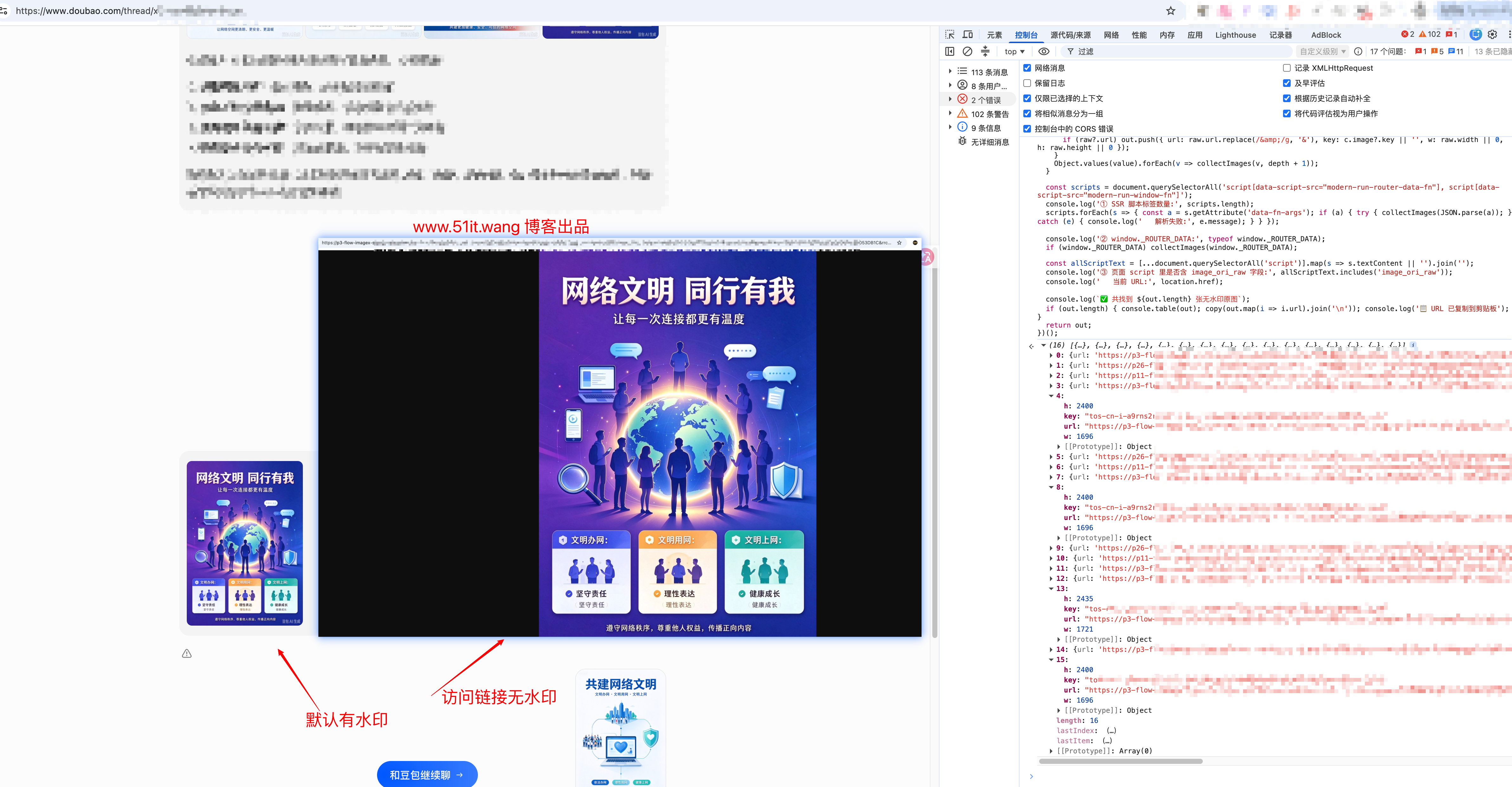
方法二:直接下载油猴插件或者 chrome 插件自己搜搜关键字“无水印豆包”
声明:
本文教程仅做学习和交流使用,请勿用于非法用途,若产生后果,本人不承担任何责任。
The End
商业转载请联系作者获得授权,非商业转载请注明本文出处及文章链接