Grafana 单点登录对接 Gitea 配置教程
Grafana 是一个用于监控展示的面板,由于项目越来越多,部署的开发测试预发布环境比较多,为了统一收集日志打算给研发和测试上一个统一查看查看日志,现目前是看日志都是统一找运维实时查看,为了满足开发在部分环境必须要看日志更加方便的排查问题,在现司也搞了基于 Loki 的日志采集日志实现。感兴趣的同学可以看我这篇文章《轻量级日志管理平台Grafana Loki搭建及应用》。
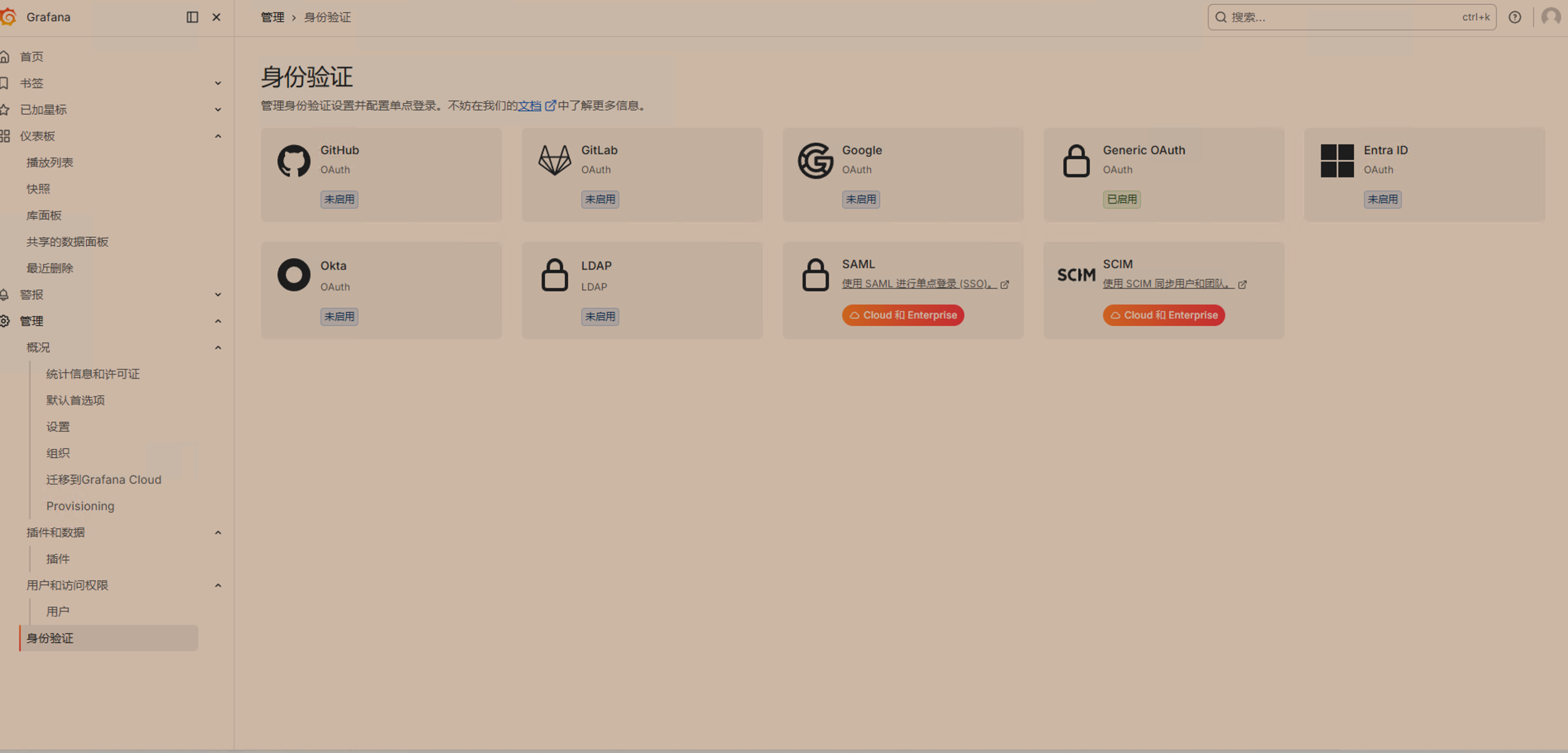
今天不介绍 loki,只说遇到的问题就是单点登录集成的问题,现司代码托管用的 Gitea 而不是 gitlab,Grafana 后台是支持基于 OAuth 协议的单点认证,支持 github、gitlab、google、通用 oauth 协议,LDAP等等如下图:
而 Gitea 是提供了类似于 github 的 oauth 协议的,理论上简单配置就行了,官方文档见:https://docs.gitea.com/development/oauth2-provider?_highlight=oauth#endpoints
| Endpoint | URL |
|---|---|
| OpenID Connect Discovery | /.well-known/openid-configuration |
| Authorization Endpoint | /login/oauth/authorize |
| Access Token Endpoint | /login/oauth/access_token |
| Token Introspection Endpoint | /login/oauth/introspect |
| OpenID Connect UserInfo | /login/oauth/userinfo |
| JSON Web Key Set | /login/oauth/keys |
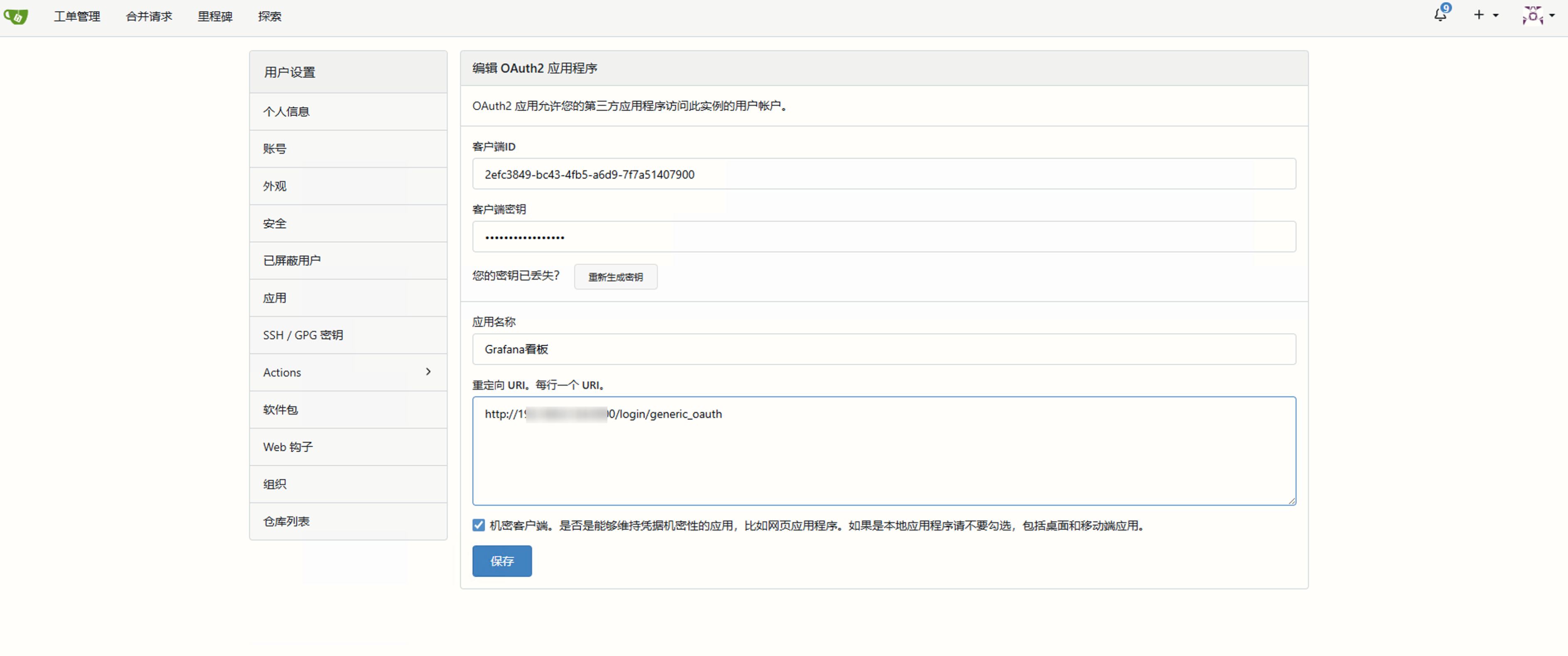
我们首先到 Gitea 创建一个应用。
依次点击右上角设置-应用-创建新的Oauth2应用程序:应用名称随便取,回调地址写你的Grafana访问地址+/login/generic_oauth
例如:http://192.168.xxx.xxx/login/generic_oauth
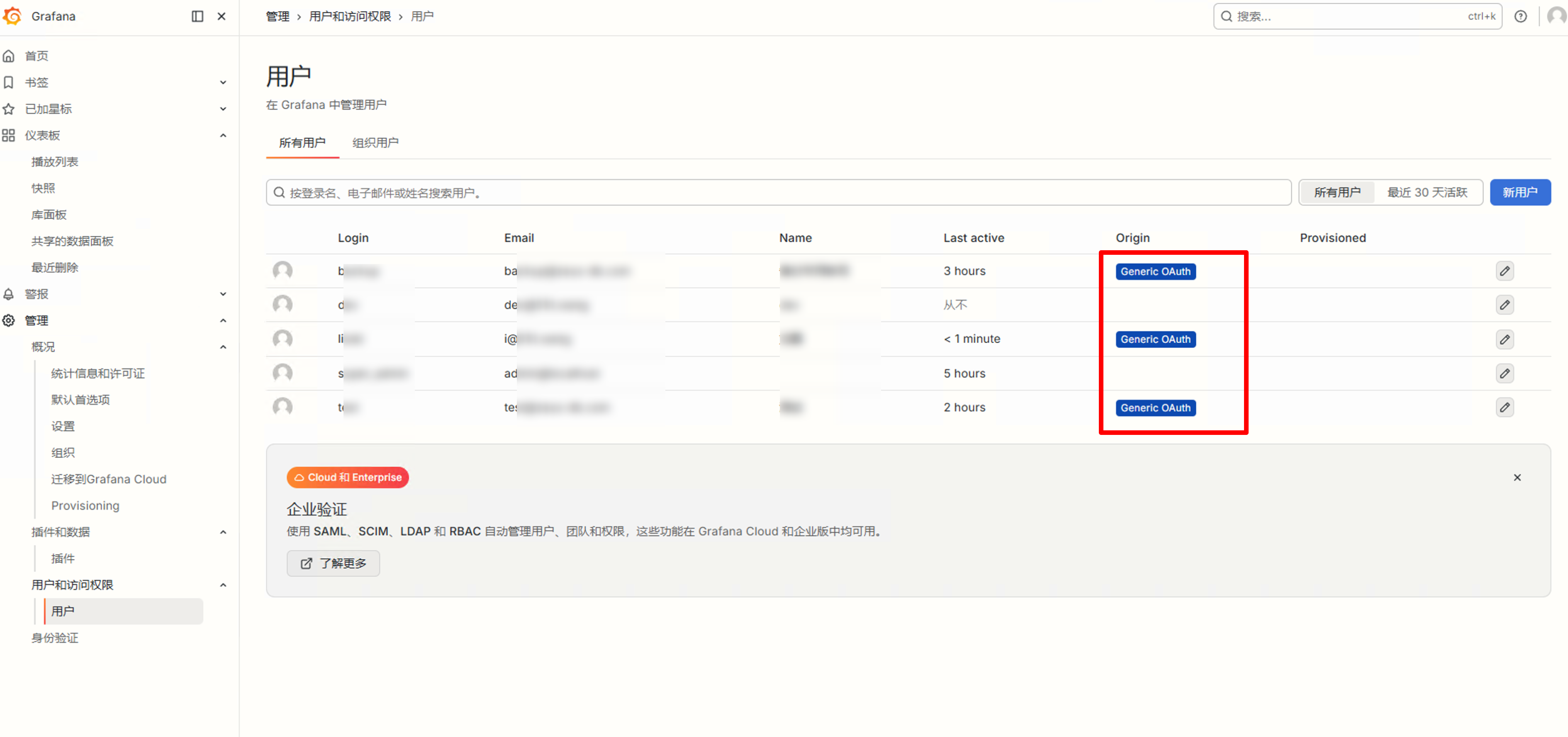
然后管理员身份账号登录Grafana依次点击配置:左侧边栏-管理-身份验证-Generic OAuth
- 显示名称:随便输,比如我是 Gitea公司代码私服
- Client ID:Gitea创建应用后自动生成的
- Client secret:Gitea创建应用后自动生成的
- 身份验证样式:默认AutoDetect 即可
- Scopes:user:email read:org
- Auth URL:http://你的gitea访问地址/login/oauth/authorize
- Token URL:http://你的gitea访问地址/login/oauth/access_token
- API URL:http://你的gitea访问地址/login/oauth/userinfo
- 允许注册:打勾,意思是如果单点过来账号不存在则默认进行创建,就只用维护 Gitea 那边账号即可
用户映射:以为 Gitea 比较特殊用户信息的字段有不一样的,为了做到对应上按照如下配置,未说明的保持为空即可。
- 名称属性路径:默认为空,填写name
- 登录属性路径:默认为空,填写preferred_username
- 电子邮箱属性路径:默认为空,填写email
然后点击保存并启用,退出到登录页后下面就有一个Sign in with Gitea公司代码私服按钮,直接点击跳转到 Gitea 授权,首次授权点击信任。
避坑
我按照这样配置了之后以为就能正常登录,结果失败,会提示Login failed,User sync failed,多次尝试之后无果,然后开了Grafana 的 debug 日志模式排查问题。
grafana-1  | logger=oauth.generic_oauth t=2026-06-01T09:29:50.631683615Z level=debug msg="Extracting user info from OAuth access token"
grafana-1  | logger=oauth.generic_oauth t=2026-06-01T09:29:50.631909726Z level=debug msg="Parsed user info from JSON" raw_json="{\"gnt\":16,\"tt\":0,\"exp\":1780309537,\"iat\":1780305937}" data="Name: , Displayname: , Login: , Username: , Email: , Upn: , Attributes: map[]" source=access_token
grafana-1  | logger=oauth.generic_oauth t=2026-06-01T09:29:50.631928855Z level=debug msg="Processing external user info" source=API data="Name: lcry, Displayname: , Login: , Username: , Email: i@51it.wang, Upn: , Attributes: map[]"
grafana-1  | logger=oauth.generic_oauth t=2026-06-01T09:29:50.6320387Z level=debug msg="Setting user info name from nameAttributePath" nameAttributePath=name
grafana-1  | logger=oauth.generic_oauth t=2026-06-01T09:29:50.632052173Z level=debug msg="Searching for login among JSON" loginAttributePath=preferred_username
grafana-1  | logger=oauth.generic_oauth t=2026-06-01T09:29:50.632122502Z level=debug msg="Set user info email from extracted email" email=i@51it.wang
grafana-1  | logger=oauth.generic_oauth t=2026-06-01T09:29:50.632134798Z level=debug msg="Processing external user info" source=access_token data="Name: , Displayname: , Login: , Username: , Email: , Upn: , Attributes: map[]"
grafana-1  | logger=oauth.generic_oauth t=2026-06-01T09:29:50.632152172Z level=debug msg="User info result" result="Id: 33, Name: lcry, Email: i@51it.wang, Login: xxxx, Role: , Groups: [], OrgRoles: map[]"
grafana-1  | logger=user.sync t=2026-06-01T09:29:50.635047023Z level=error msg="Failed to create user" error="user not found" auth_module=oauth_generic_oauth auth_id=33
grafana-1  | logger=authn.service t=2026-06-01T09:29:50.635122956Z level=error msg="Failed to run post auth hook" client=auth.client.generic_oauth id= error="[user.sync.internal] unable to create user: user not found"
grafana-1  | logger=context userId=0 orgId=0 uname= t=2026-06-01T09:29:50.644763065Z level=info msg="Request Completed" method=GET path=/login/generic_oauth status=302
从日志上看用户信息获取正确,最终解析出用户数据进行创建账号的时候失败了,然后 AI 给了思路说再直接强制从环境变量中重写允许注册的信息。不知道是什么原因,按照下面设置相关环境变量,你可以直接改 /etc/grafana/grafana.ini 配置文件,我是使用的 docker-compose 部署所以直接在环境变量里添加更快,两种方式均可。
    environment:
      - GF_AUTH_ANONYMOUS_ENABLED=false
      - GF_SECURITY_ADMIN_USER=lcry
      - GF_SECURITY_ADMIN_PASSWORD=www.51it.wang博客出品
      - GF_SERVER_ROOT_URL=http://xx.xx.xxx.xx:3000
      # 下面这2行重要
      - GF_AUTH_GENERIC_OAUTH_ALLOW_SIGN_UP=true
      - GF_AUTH_OAUTH_ALLOW_INSECURE_EMAIL_LOOKUP=true
      - GF_LOG_LEVEL=debug
然后重启grafana容器再次尝试直接单点登录成功。
即便用户不存在再首次授权登录后会进行自动创建,后面Gitea信息变更会做更新操作,这样就只用维护开发者在Gitea的账号即可完成多平台认证。
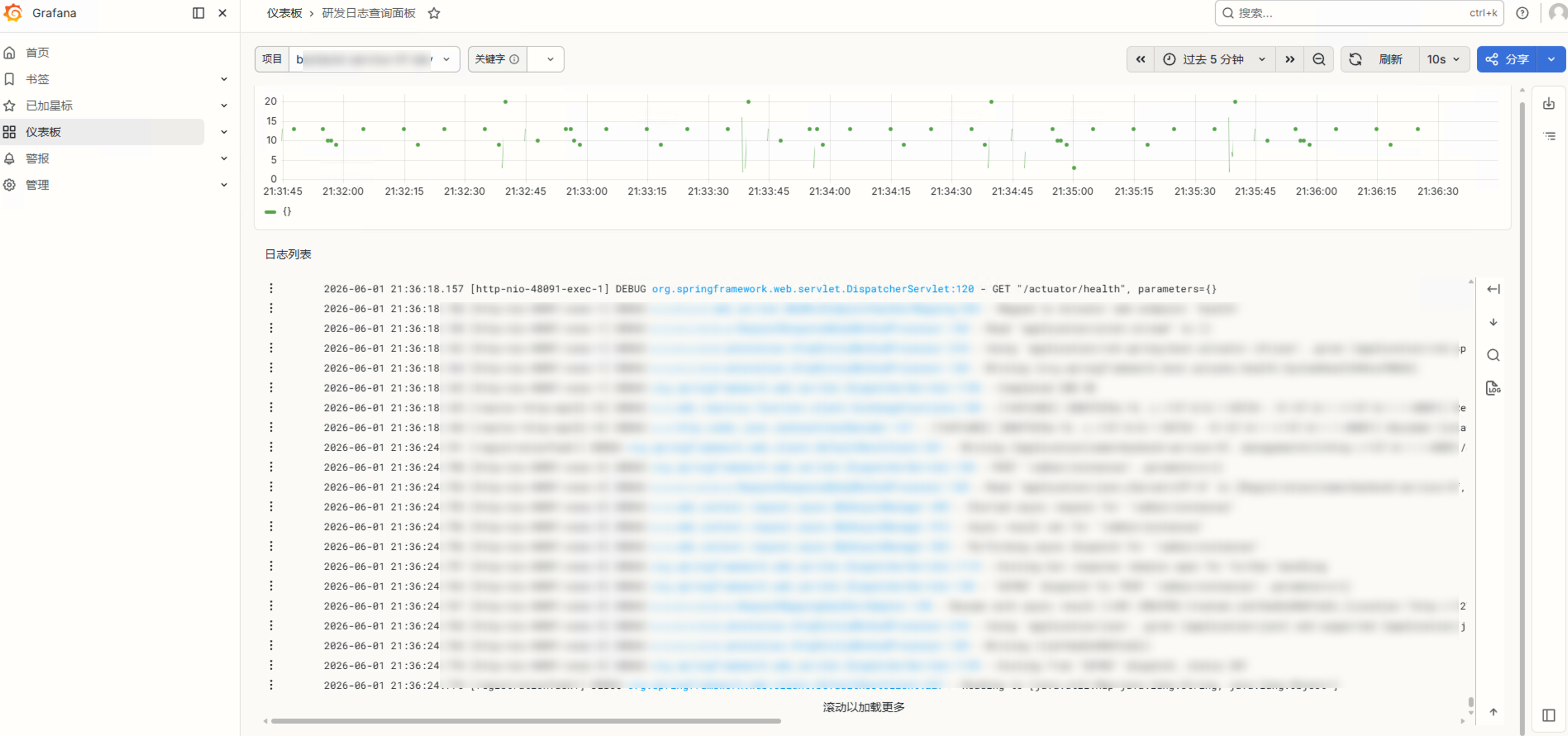
最后分享一个配置简单的用于标签分组查询日志的仪表盘,可以通过项目打标的项目标签以及关键字进行筛选日志,效果如下:
面板配置 json:
{
  "apiVersion": "dashboard.grafana.app/v2",
  "kind": "Dashboard",
  "metadata": {
    "name": "ae3ec2c4-1c19-4450-9403-226270fe0c4f",
    "namespace": "default",
    "uid": "459530de-6d8f-436c-af98-2a965efdd55b",
    "resourceVersion": "1780299277848985",
    "generation": 15,
    "creationTimestamp": "2026-06-01T07:12:50Z",
    "labels": {
      "grafana.app/deprecatedInternalID": "3200181491736576"
    },
    "annotations": {
      "grafana.app/createdBy": "anonymous:0",
      "grafana.app/folder": "",
      "grafana.app/message": "123123",
      "grafana.app/saved-from-ui": "Grafana v13.0.1+security-01 (9bbe672d)",
      "grafana.app/updatedBy": "anonymous:0",
      "grafana.app/updatedTimestamp": "2026-06-01T07:34:37Z"
    }
  },
  "spec": {
    "annotations": [
      {
        "kind": "AnnotationQuery",
        "spec": {
          "query": {
            "kind": "DataQuery",
            "group": "grafana",
            "version": "v0",
            "datasource": {
              "name": "-- Grafana --"
            },
            "spec": {}
          },
          "enable": true,
          "hide": true,
          "iconColor": "rgba(0, 211, 255, 1)",
          "name": "Annotations & Alerts",
          "builtIn": true
        }
      }
    ],
    "cursorSync": "Off",
    "editable": true,
    "elements": {
      "panel-2": {
        "kind": "Panel",
        "spec": {
          "id": 2,
          "title": "",
          "description": "",
          "links": [],
          "data": {
            "kind": "QueryGroup",
            "spec": {
              "queries": [
                {
                  "kind": "PanelQuery",
                  "spec": {
                    "query": {
                      "kind": "DataQuery",
                      "group": "loki",
                      "version": "v0",
                      "datasource": {
                        "name": "P8E80F9AEF21F6940"
                      },
                      "spec": {
                        "direction": "backward",
                        "editorMode": "code",
                        "expr": "sum(count_over_time({project=~\"$project\"} |~ \"$search\"[$__interval]))",
                        "queryType": "range"
                      }
                    },
                    "refId": "A",
                    "hidden": false
                  }
                }
              ],
              "transformations": [],
              "queryOptions": {}
            }
          },
          "vizConfig": {
            "kind": "VizConfig",
            "group": "timeseries",
            "version": "13.0.1+security-01",
            "spec": {
              "options": {
                "annotations": {
                  "clustering": -1,
                  "multiLane": false
                },
                "legend": {
                  "calcs": [],
                  "displayMode": "list",
                  "placement": "bottom",
                  "showLegend": true
                },
                "tooltip": {
                  "hideZeros": false,
                  "mode": "single",
                  "sort": "none"
                }
              },
              "fieldConfig": {
                "defaults": {
                  "thresholds": {
                    "mode": "absolute",
                    "steps": [
                      {
                        "value": 0,
                        "color": "green"
                      }
                    ]
                  },
                  "color": {
                    "mode": "palette-classic"
                  },
                  "custom": {
                    "axisBorderShow": false,
                    "axisCenteredZero": false,
                    "axisColorMode": "text",
                    "axisLabel": "",
                    "axisPlacement": "auto",
                    "barAlignment": 0,
                    "barWidthFactor": 0.6,
                    "drawStyle": "line",
                    "fillOpacity": 0,
                    "gradientMode": "none",
                    "hideFrom": {
                      "legend": false,
                      "tooltip": false,
                      "viz": false
                    },
                    "insertNulls": false,
                    "lineInterpolation": "linear",
                    "lineWidth": 1,
                    "pointSize": 5,
                    "scaleDistribution": {
                      "type": "linear"
                    },
                    "showPoints": "auto",
                    "showValues": false,
                    "spanNulls": false,
                    "stacking": {
                      "group": "A",
                      "mode": "none"
                    },
                    "thresholdsStyle": {
                      "mode": "off"
                    }
                  }
                },
                "overrides": []
              }
            }
          }
        }
      },
      "panel-3": {
        "kind": "Panel",
        "spec": {
          "id": 3,
          "title": "日志列表",
          "description": "",
          "links": [],
          "data": {
            "kind": "QueryGroup",
            "spec": {
              "queries": [
                {
                  "kind": "PanelQuery",
                  "spec": {
                    "query": {
                      "kind": "DataQuery",
                      "group": "loki",
                      "version": "v0",
                      "datasource": {
                        "name": "P8E80F9AEF21F6940"
                      },
                      "spec": {
                        "direction": "forward",
                        "editorMode": "code",
                        "expr": "{project=~\"$project\"} |= \"$search\"",
                        "queryType": "range"
                      }
                    },
                    "refId": "A",
                    "hidden": false
                  }
                }
              ],
              "transformations": [],
              "queryOptions": {}
            }
          },
          "vizConfig": {
            "kind": "VizConfig",
            "group": "logs",
            "version": "13.0.1+security-01",
            "spec": {
              "options": {
                "dedupStrategy": "exact",
                "detailsMode": "sidebar",
                "displayedFields": [],
                "enableInfiniteScrolling": true,
                "enableLogDetails": true,
                "fontSize": "small",
                "prettifyLogMessage": false,
                "showCommonLabels": false,
                "showControls": true,
                "showFieldSelector": false,
                "showLabels": true,
                "showLevel": true,
                "showTime": false,
                "sortOrder": "Ascending",
                "timestampResolution": "ms",
                "unwrappedColumns": false,
                "wrapLogMessage": false
              },
              "fieldConfig": {
                "defaults": {},
                "overrides": []
              }
            }
          },
          "transparent": true
        }
      }
    },
    "layout": {
      "kind": "GridLayout",
      "spec": {
        "items": [
          {
            "kind": "GridLayoutItem",
            "spec": {
              "x": 0,
              "y": 0,
              "width": 24,
              "height": 5,
              "element": {
                "kind": "ElementReference",
                "name": "panel-2"
              }
            }
          },
          {
            "kind": "GridLayoutItem",
            "spec": {
              "x": 0,
              "y": 5,
              "width": 24,
              "height": 16,
              "element": {
                "kind": "ElementReference",
                "name": "panel-3"
              }
            }
          }
        ]
      }
    },
    "links": [],
    "liveNow": true,
    "preload": false,
    "tags": [],
    "timeSettings": {
      "timezone": "browser",
      "from": "now-5m",
      "to": "now",
      "autoRefresh": "10s",
      "autoRefreshIntervals": [
        "5s",
        "10s",
        "30s",
        "1m",
        "5m",
        "15m",
        "30m",
        "1h",
        "2h",
        "1d"
      ],
      "hideTimepicker": false,
      "fiscalYearStartMonth": 0
    },
    "title": "研发日志查询面板",
    "variables": [
      {
        "kind": "QueryVariable",
        "spec": {
          "name": "project",
          "current": {
            "text": "xxxxx-dev",
            "value": "xxxxx-dev"
          },
          "label": "项目",
          "hide": "dontHide",
          "refresh": "onDashboardLoad",
          "skipUrlSync": false,
          "query": {
            "kind": "DataQuery",
            "group": "loki",
            "version": "v0",
            "datasource": {
              "name": "P8E80F9AEF21F6940"
            },
            "spec": {
              "label": "project",
              "refId": "LokiVariableQueryEditor-VariableQuery",
              "stream": "",
              "type": 1
            }
          },
          "regex": "",
          "regexApplyTo": "value",
          "sort": "alphabeticalAsc",
          "definition": "",
          "options": [],
          "multi": false,
          "includeAll": false,
          "allValue": ".+",
          "allowCustomValue": true
        }
      },
      {
        "kind": "QueryVariable",
        "spec": {
          "name": "search",
          "current": {
            "text": "",
            "value": ""
          },
          "label": "关键字",
          "hide": "dontHide",
          "refresh": "onDashboardLoad",
          "skipUrlSync": false,
          "description": "这里可以通过关键字搜索",
          "query": {
            "kind": "DataQuery",
            "group": "loki",
            "version": "v0",
            "datasource": {
              "name": "P8E80F9AEF21F6940"
            },
            "spec": {}
          },
          "regex": "",
          "regexApplyTo": "text",
          "sort": "disabled",
          "definition": "",
          "options": [],
          "multi": false,
          "includeAll": false,
          "allowCustomValue": true
        }
      }
    ]
  }
}
对了,最后补充一点,针对于 loki 最新版官方改了架构,和早期文章采集docker 容器日志有更加方便的方式,直接部署一个 Alloy 采集组件,然后自动监听 docker 进程实时抓取即可。官方参考链接:https://grafana.com/docs/loki/latest/get-started/quick-start/quick-start/
商业转载请联系作者获得授权,非商业转载请注明本文出处及文章链接